

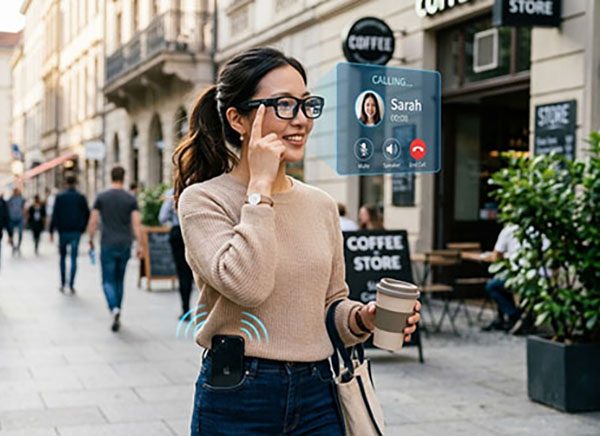
What can AI glass actually do without a screen? 5 Mind-Blowing Ways It Works
What can AI glass actually do without a screen? Smart Bluetooth glasses can still let you take calls, listen to music and navigation, activate your phone’s voice assistant, remotely control your phone’s camera, and protect your eyes with light‑adaptive lenses — all while fitting your prescription needs. They are hands‑free, lightweight, and work for 6‑7 hours on a single charge.
You don’t need a display to make a pair of glasses truly smart. These Bluetooth glasses focus on what matters most: keeping your ears and voice connected while your eyes stay on the real world. They have no built‑in camera, no screen, no bulky electronics in your field of view. Instead, they act like a wearable headset that looks like normal eyewear.

Here are five surprising things they can do — backed by real features you can use today.
1. Crystal‑clear calls without touching your phone
You double‑tap the frame. The glasses answer your call. Microphones pick up your voice, speakers deliver the other person’s voice directly to your ear. You keep walking, driving, or cooking with both hands free.
Unlike earbuds, these glasses don’t block your ear canal, so you still hear traffic, people, and ambient sounds. The open‑ear design makes phone calls safer and more natural.
Real example: You’re riding a bike. Your boss calls. One tap on the glasses and you’re talking, without stopping or reaching for your phone.
2. All‑day music, podcasts, and navigation audio
Full charge gives you 6‑7 hours of continuous music playback. You can also use just one side (single‑ear mode) to save battery or stay aware of surroundings. The glasses connect to your phone via Bluetooth, so any audio — Spotify, Apple Music, Google Maps directions, YouTube — plays directly into your ears.
Because there’s no screen, you never have to look down at a playlist or map. Voice guidance from Maps speaks turn‑by‑turn; your podcast plays in the background; you tap the frame to skip tracks.
Real example: You’re walking through a new city. The glasses whisper “turn left in 50 meters” while your favorite playlist continues. No phone in hand, no screen glare.
3. Instant access to your phone’s voice assistant
A simple tap or long press wakes up Siri, Google Assistant, or Alexa through the glasses. Then you just speak naturally. “What’s the weather today?” “Remind me to buy eggs.” “Call Mom.” “Set a timer for 15 minutes.”
The assistant answers through the glasses’ speakers. You never pull out your phone. It’s like having a smart speaker on your face — but private, mobile, and silent to everyone else.
Real example: Your hands are covered in flour while baking. “Hey Siri, add flour to my shopping list.” Done. No screen, no mess.
4. Remote control of your phone’s camera — no built‑in camera needed
This is a clever trick. The glasses don’t have a camera of their own. Instead, they connect to your phone’s camera via Bluetooth. You press a button on the glasses frame, and your phone’s camera takes a photo or starts recording video.
You can place your phone on a table, on a tripod, or anywhere. Then you stand 10 feet away, pose with friends or family, and trigger the shutter just by tapping your glasses. It’s a wireless remote shutter release built into your everyday eyewear.
Real example: You’re on vacation with friends. You set your phone on a rock overlooking the sunset. Everyone gets in the frame. You tap your glasses — click. No timer, no running back and forth.

5. Prescription lenses + photochromic self‑adjusting tint
These glasses are not just gadgets — they are real eyewear. You take them to any local optical shop, and they can fit detachable prescription lenses for nearsightedness or presbyopia (age‑related farsightedness).
Even better: you can get photochromic lenses. These stay crystal clear indoors, but when you step outside into sunlight, they automatically darken like sunglasses. Back inside, they fade to clear again. All‑day eye protection, zero effort.
This means one pair of glasses handles three jobs: your daily vision correction, a Bluetooth headset, and adaptive sun protection — all without a screen.
Real example: You walk out of an office into bright afternoon sun. Within seconds, your lenses darken. Your music keeps playing. You take a call. Everything just works.
Quick comparison: What these smart glasses do (and don’t do)
| Feature | How it works without a screen |
| Phone calls | Tap frame → answer/end call → open‑ear speakers + mic |
| Music & audio | 6‑7 hours playback, single‑ear support, Bluetooth streaming |
| Voice assistant | Tap → wake Siri/Google → speak command → hear reply |
| Remote camera trigger | Tap frame → phone’s camera takes photo or video |
| Prescription lenses | Detachable, fit at local optical shop |
| Adaptive tint | Photochromic: dark in sun, clear indoors |
| Built‑in camera | No — privacy friendly |
| Screen / display | No — eyes stay on real world |
Who are these actually for ?
- Drivers and cyclists – take calls and hear navigation without taking eyes off the road.
- Office workers – listen to music while looking at monitors, tap to take calls, never miss a reminder.
- Outdoor enthusiasts – photochromic lenses + hands‑free audio for hiking, running, or fishing.
- People who wear prescription glasses daily – one pair does everything.
- Privacy‑conscious users – no camera means no one worries about being recorded.

Frequently Asked Questions (FAQ)
Q1: Do these glasses have a built‑in screen or display?
No. They have no screen at all. All information comes through audio (speakers) or tactile taps.
Q2: Can I use them if I already wear prescription glasses?
Yes. The frames support detachable prescription lenses. You bring them to any local optician to have your prescription fitted.
Q3: How do photochromic lenses work?
They contain special molecules that darken when exposed to UV light (sunlight) and become clear again indoors. They work automatically, no battery or button required.
Q4: How long does the battery last ?
Up to 6‑7 hours of continuous music playback on a full charge. Standby time is much longer. You can also use only one earpiece to extend battery life.
Q5: Can I use the voice assistant with my iPhone or Android?
Yes. They work with Siri (iPhone), Google Assistant (Android), and Alexa (via the Alexa app on either platform).
Q6: How do I control the phone camera remotely?
The glasses connect to your phone via Bluetooth. Open your phone’s camera app, then tap the designated button on the glasses frame — the phone takes a photo or starts/stop video recording. No extra app needed on most models.
Q7: Are they comfortable for all‑day wear?
Yes. They are designed as normal glasses — lightweight, adjustable, and balanced. Because there is no heavy screen or camera module, they feel like regular eyewear while providing smart audio features.