
AI Glass Bluetooth Function: Remote Smartphone Shutter
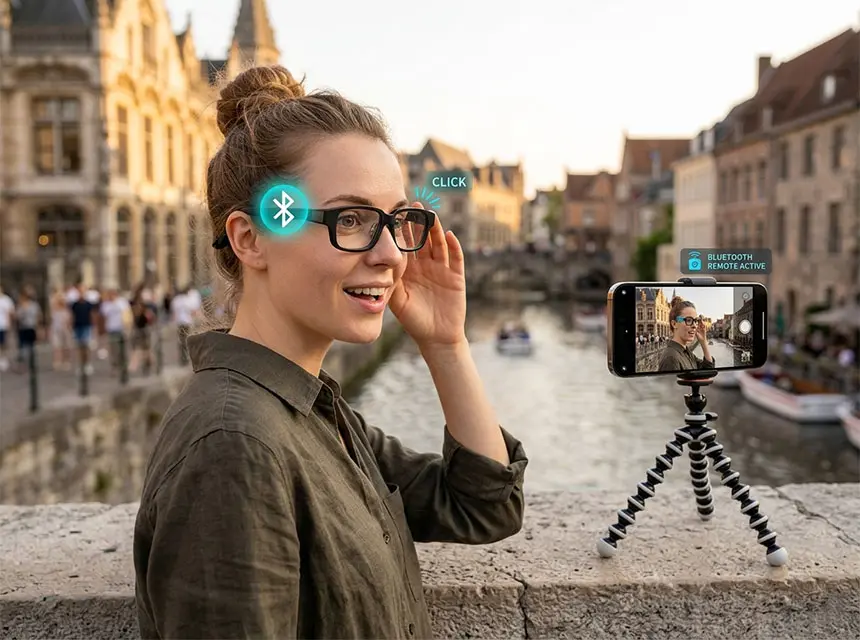
The Remote Smartphone Shutter feature redefines the relationship between wearable tech and mobile photography. In this specific configuration, where the AI glasses do not have an onboard camera, they serve as a high-precision, wearable remote control that taps into the powerful optics of your smartphone.
1. The Core Concept: “Wearable Command Center”.
Instead of settling for a low-resolution integrated camera, this feature allows you to use your smartphone’s 50MP sensors, Telephoto lenses, and Pro-modes. The AI glasses act as the wireless bridge, giving you total control over your phone’s camera shutter from up to 10 meters (33 feet) away.
2. Strategic Advantages.
- Privacy-Centric Design: Since the glasses have no visible lens, they look like premium, stylish eyewear. This removes the “creepiness factor” often associated with smart glasses, making them socially acceptable in any environment.
- Superior Image Quality: By using the glasses to trigger your phone, you are capturing images with the best hardware available—your smartphone’s camera—ensuring your photos are social-media and print-ready.
- Zero Camera Shake: Touching a smartphone screen to take a photo often causes a micro-vibration. Using the glasses as a Remote Shutter ensures the phone remains perfectly still, which is critical for crisp night shots and long-exposure photography.
3. Key Functionalities.
One-Tap Execution.
The glasses utilize the Bluetooth HID protocol to interact with the phone’s native camera app.
- Single Tap: Captures a high-resolution photo instantly.
- Long Press: Starts or stops video recording.
- Voice Trigger: Say “Capture” or “Snap” to take a photo completely hands-free.
Enhanced Framing (The HUD Advantage).
In high-end models, the Heads-up Display (HUD) can act as a remote viewfinder. You can see exactly what your phone sees right in your line of sight, allowing you to frame yourself perfectly in a group shot even if the phone is across the room.
4. Primary Use Cases.
| Use Case | Why It’s Better with AI Glasses |
| Professional Selfies | Place the phone at a distance for a “magazine-style” portrait without needing a selfie stick. |
| B2B Group Photos | No more “10-second timer” sprints. Stand with your clients and snap the photo exactly when everyone is smiling. |
| Discreet Street Photography | Position your phone on a tripod or ledge and capture natural, candid moments by simply touching your temple. |
| Vlogging/Content Creation | Start and stop your video takes without having to walk back to your phone, saving time in post-production. |
The Remote Smartphone Shutter is more than just a button on your glasses; it’s the ultimate synergy between the comfort of wearables and the power of professional mobile optics.